What it does
Your Minecraft dashboard on every new tab
Find a server fast
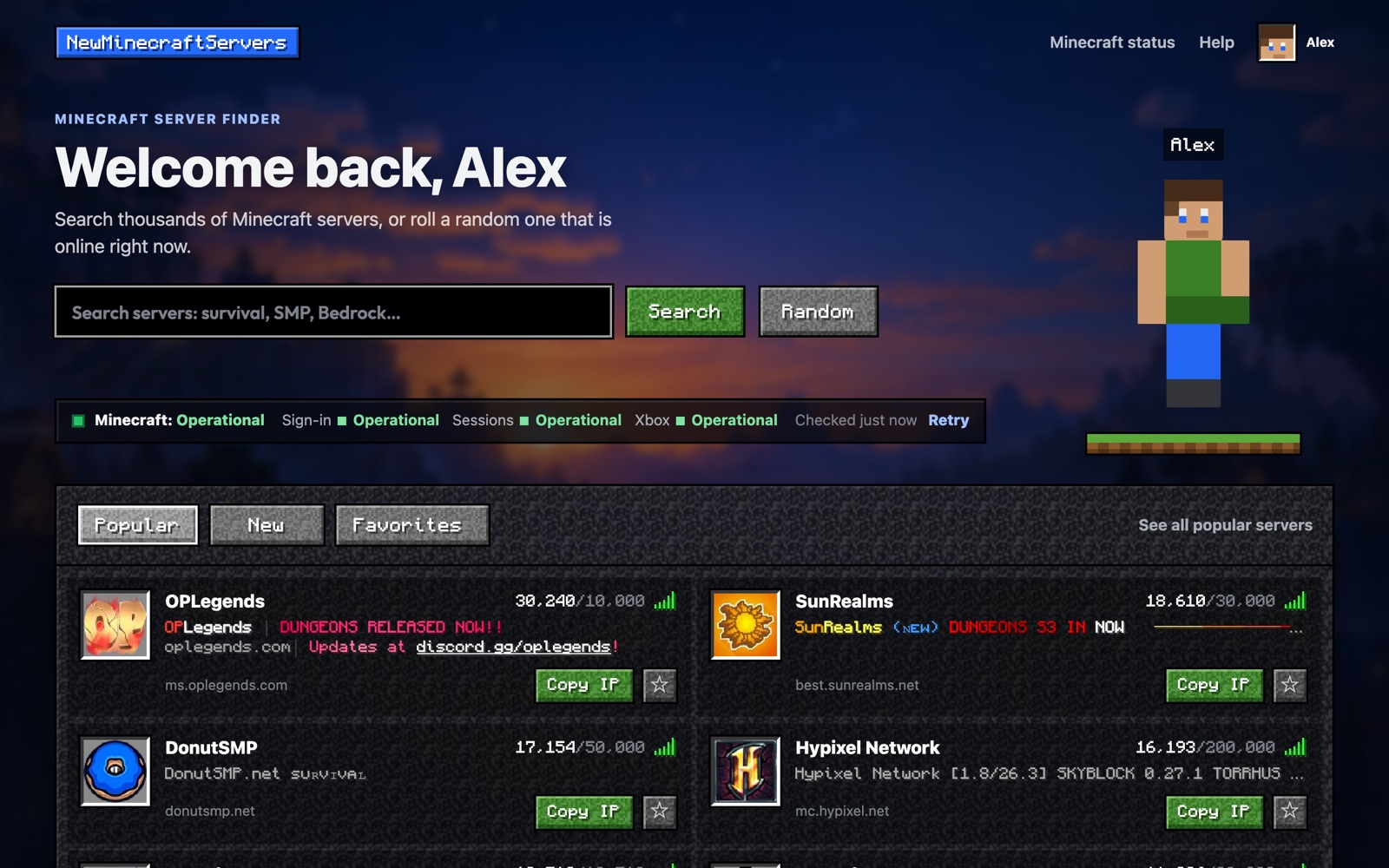
Search thousands of servers by name, game mode or edition, flip between Popular and New, or roll a random server that is online right now. Every row shows the server’s icon, its coloured MOTD and live player count, like the in-game server list.
See if Minecraft is down
One line under the search shows the Minecraft sign-in chain, session server and Xbox status, from the same monitor as our live status page.
Save your favorites
Star the servers you play on. They get their own Favorites tab and sit in the toolbar popup, so an address is always one click from copied.
Show off your skin
Add your Minecraft username and your skin stands next to the search in 3D, with its face as your avatar. It is rendered right in Chrome.
How it works
Up and running in three steps
Add it to Chrome
Install it from the Chrome Web Store. It is free and needs no account.
Open a new tab
Your Minecraft dashboard replaces the blank new-tab page. Chrome may ask whether to keep the change.
Search, roll or star
Find a server, copy its address, star it for later, or add your username for your skin. Everything stays in your browser.
Privacy
Private by design
- No ads and no analytics.
- No access to your browsing history or other websites.
- Your username and favorites are stored only in your Chrome profile.
- It only talks to newminecraftservers.net.
FAQ
Questions about the extension
Is the extension free?
Yes. It is free, has no ads, and does not need an account.
Does it track what I do online?
No. It has no analytics and cannot see your browsing history or other websites. It only requests server listings, Minecraft service status and, if you add one, your username's public profile from newminecraftservers.net.
Can I get my normal new tab page back?
Yes. Turn the extension off or remove it from chrome://extensions and Chrome goes back to its usual new tab page.
Does it work in other browsers?
It is built and tested for Google Chrome. Other Chromium-based browsers that install from the Chrome Web Store may work, but are not tested.
What happens when I am offline?
The dashboard keeps showing the last results it loaded, marked as stale, and refreshes when your connection returns.
Make every new tab a Minecraft tab
Prefer the website? Everything the extension shows is here too: new servers, the live Minecraft status, and our free tools.
Coming soon to Chrome